Video Converter Software - Convert AVI MPEG WMV MOV
Home  |  Products  |   Special Offers |  Download  |  Order Now  | Support  
    Advanced X Video Converter - Complete video conversion, joining and splitting solutions

avi mpeg video converter
Supported Input and Output Formats
Convert
AVI (DivX, XviD...), MPEG (MPEG-1, MPEG-2), MOV (QuickTime), WMV/ASF, MP4, 3GP, M4V, VCD/DAT and SVCD.
To
AVI, MPEG-1/MPEG-2, MOV, WMV/ASF, VCD/SVCD; WAV, WMA, MP3; BMP, JPG, PNG, TIF, GIF
Advanced X Video Converter
Download | Buy Now  (Only $29.95)

Advanced X Video Converter is a comprehensive video conversion software that makes it easy to convert, join, and split video files. It can also extract audio tracks and images from videos.   

Advanced X Video Converter 5.0 Just Realesed! Much faster conversion speed and better video quality. Try it Now!

What can Advanced X Video Converter do for you:


1. Convert Videos Between Various Video Formats

Advanced X Video Converter supports almost all popular video formats, e.g. AVI (DivX, XviD...), MPEG (MPEG-1, MPEG-2), MOV (QuickTime), WMV/ASF, MP4, 3GP, M4V, VCD/DAT and SVCD. If you have a collection of video files to convert from one format to another, you can transform them quickly in batch mode.


2. Join multiple videos in various formats into one large movie file
Advanced X Video Converter lets you join small video files into a large movie file. You can take the vacation, wedding, and family movies that you have scattered on your hard drive, and combine them creatively into a single movie file. Your movies will be much more enjoyable when you can play them all at once, without interruption.


3. Split Video Into Smaller Pieces
Advanced X Video Converter also splits large video files into smaller pieces. You can create files that are small enough to email to friends and family.


4. Extract Audio From Video
If you want to listen to a song that’s in the background of your video, you can use the Extract Audio from Video option that the program features, and you will get a standard WAV/WMA/MP3 audio file that you can play whenever you want, without having to run the video too.


5. Extract Images From Video

Also, if there’s a view that you like in one of your movies, or you just want to convert a video into images, Advanced X Video Converter will help you do this with the Convert Video to Pictures feature. You can change the number of pictures which will be taken per second, and you can select the start and end time, so that no unnecessary pictures are taken.


1. Select A Task


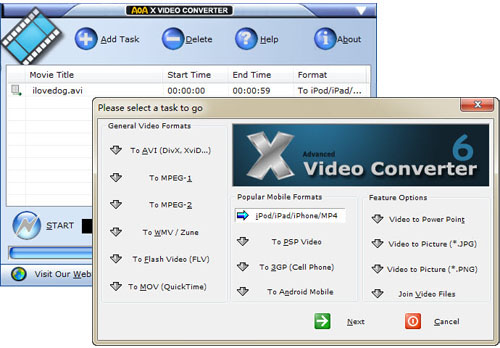
You'll do all your work through this window, where you'll find options for converting, splitting, and joining video files; extracting audio; and turning video into images.

 
2. Edit

Add video files.
Set the output directory.
Advanced Settings (optional).

3. Convert
Press the "Start" button to begin the video conversion.

System Requirements

  • Microsoft Windows 98SecondEdition, Windows NT/2000/2003, Windows XP, Vista.
  • QuickTime Player (if you want to convert and playback MOV files).
  • Codec Pack (if you want to convert MPEG-2 files).
dvd copy
+ + + +
US$ 159.80 $109.80 HOT!

Buy Now and
Save $50!
dvd ripper
+ video converter US$ 64.90 $52.9

Buy Now and
Save $12!
Screenshot
Download Free Trial
Order Now
Testimonials
Press Resources

special offer for x video converter

iPod 3GP PSP MP4 Video Converter

How to Convert a DVD?

It's strongly recommended to use AOA DVD RIPPER, which aims to convert DVDs/VOB to AVI/MPEG/WMV/MP4/3GP/WAV format and outputs smaller size video with better quality.

Testimonials

Joseph Holton, US
Easy to use and supports many file types, I find it to be a fast easy to use video conversion tool which not only supports most video file types,but has all the options the advanced user could want as well.

Steve Pestell, UK
I need to convert 3Ds AVI files to mpgs for students DVDs. Your video converter seems fantastic to work with.

Darrick N, Denmark
Perfect! It did just what it said it would. With a simple user interface that required NO learning process! All the different options for converting video, a friend of mine recommended the program.

Thomas G, US
I created my blog and I want to use video file on my blog. Great evaluation program that did exactly what it said on the tin.

More...

Português

Copyright © 2008 AoAMedia.Com. All rights reserved.